How Racing Car Font Gave My Small Business a Bold New Look
Last spring, I found myself sitting at my kitchen table with a stack of plain brown boxes, a roll of twine, and a growing sense of frustration. I had just finished baking a new batch of my signature caramel pecan bars, and I needed labels. Not just any labels—labels that felt like me. Labels that would make someone pick up a box and think, “I want to know who made this.”
I had spent weeks perfecting the recipe, sourcing the best local butter, and testing different baking temperatures. But when it came to the packaging, I was stuck. I tried a few free fonts I found online, but everything looked either too serious, too cute, or just plain forgettable. My business deserved better than that. I wanted something that captured the energy I put into every batch—the hustle, the passion, the love for what I do.
That’s when I found Racing Car.
What Racing Car Brings to the Table
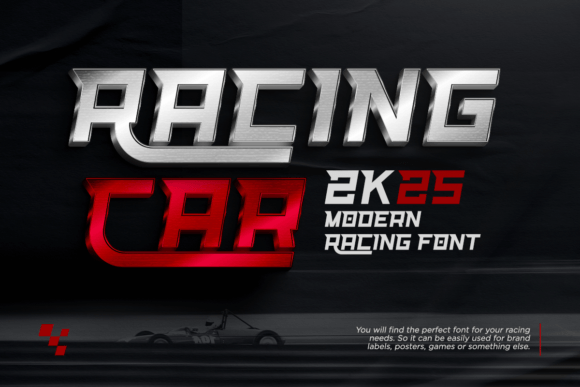
Racing Car is a display font that feels like it’s moving even when it’s standing still. The letters are sleek, angular, and full of attitude. There’s a boldness to it that immediately says, “We’re here, and we mean business.” But it’s not aggressive—it’s confident. It has the kind of energy that makes you sit up and take notice, which is exactly what I wanted for my bakery boxes, my Instagram posts, and my business cards.
When I first tried Racing Car on a mockup of my label, I actually smiled. The font looked like it belonged on a product that was made with care and intention. It didn’t just sit there on the page—it announced itself. That’s the kind of first impression every small business owner dreams of.
Where Racing Car Really Shines for Small Businesses
One of the best things about Racing Car is how versatile it is, even though it’s a display font. I’ve used it for everything from the main headline on my bakery boxes to the title on my menu boards. Here are a few places where I’ve seen it make a real difference:
- Product labels and packaging: The bold, angular shapes of Racing Car stand out beautifully on small boxes, jars, and bags. It gives a handmade product a polished, professional edge without losing the personal touch.
- Business cards and thank-you cards: I printed a small batch of thank-you cards with Racing Car for the header, and customers have actually commented on how “cool” they look. It’s a small detail that makes a big impression.
- Social media graphics: When I post a photo of a new flavor on Instagram, I use Racing Car for the overlay text. It’s readable even on a phone screen, and it gives my feed a cohesive, recognizable look.
- Menu boards and signage: For a local market stall, I created a simple chalkboard-style sign using Racing Car for the main title. It drew people in from across the room.
- Website banners and online shop headers: The font works just as well in digital spaces. It adds a sense of energy and motion that static images often lack.
How Typography Changes the Way People See Your Business
Before I started paying attention to fonts, I didn’t realize how much they affect the way people perceive a brand. I thought a good product would speak for itself. And sure, quality matters. But the truth is, people make snap judgments based on what they see. A font that feels cheap or generic can make even the best caramel pecan bar look like an afterthought.
Racing Car helped me create a consistent visual identity across everything I do. When customers see my packaging, my social media posts, and my business cards, they see the same bold, energetic personality. That consistency builds trust. It says, “This business knows what it’s doing.” And in a world where small businesses are competing with big brands, that trust is gold.
What Racing Car Is Best For (and What It’s Not)
Let me be honest: Racing Car is not a font you want to use for long paragraphs of text. It’s a display font, which means it shines in short, punchy applications. Headlines, product names, taglines, logos, and decorative accents are where it really comes alive. For body text, you’ll want to pair it with something simpler.
I use Racing Car for the main title on my labels and menus, and then I use a clean sans serif font for the ingredients list, price, or description. That way, the boldness of Racing Car gets all the attention it deserves, and the supporting text remains easy to read.
Readability Tips for Small Labels and Screens
If you’re planning to use Racing Car on small packaging or mobile screens, here are a few things I’ve learned along the way:
- Give it space. Because the letters are bold and angular, they need a little breathing room. Don’t crowd them with other design elements.
- Use contrasting colors. Racing Car pops best when there’s a strong contrast between the font color and the background. A dark font on a light background, or a bright accent color on a neutral background, works wonders.
- Test the size. On a very small label, test the font size before you print. Racing Car is readable at small sizes, but you want to make sure the details don’t get lost.
- Consider the material. If you’re printing on a textured surface, like kraft paper or fabric, check how the font looks in a mockup first. The bold lines of Racing Car tend to hold up well, but it’s always good to test.
Simple Font Pairing Ideas That Work
One of the things I love most about Racing Car is how easy it is to pair with other fonts. Because it has such a strong personality, you don’t need much else to make your design feel complete. Here are a few pairings I’ve tried and loved:
- With a clean sans serif: A simple, modern sans serif like Helvetica or a similar neutral font balances the boldness of Racing Car perfectly. This is my go-to for labels and menus.
- With an elegant serif: If you want a more sophisticated look, pair Racing Car with a refined serif font for the smaller text. The contrast between the angular display font and the classic serif creates a beautiful tension.
- With a handwritten style: For a more playful, artisanal feel, a soft handwritten font can soften the edges of Racing Car and add a personal touch. This works great for thank-you cards or social media posts.
- With a script font: If your brand has a touch of elegance or romance, a flowing script alongside Racing Car can create a really striking visual hierarchy.
What to Check Before You Use Racing Car in Your Projects
Before you start designing, there are a few practical things to look into. First, check what file formats are included with your download. Most premium fonts come with OTF, TTF, and sometimes WOFF for web use. Make sure you have the format that works with your design software.
Also, look into whether the font includes alternates, ligatures, or multiple weights. Some versions of Racing Car may offer stylistic alternates that give you extra creative flexibility. And if you plan to use the font for multilingual packaging or signage, confirm that it supports the characters you need.
Finally, and this is important, check the commercial license. If you’re using Racing Car for product labels, packaging, merchandise, or any client work, you need to make sure your license covers commercial use. The same goes for digital downloads, templates, or social media graphics that are part of a paid offering. A proper commercial font license protects your business and respects the designer’s work.
How Racing Car Helped Me Build a Brand I’m Proud Of
Looking back, I can’t believe I spent so long trying to make generic fonts work for my business. Racing Car didn’t just give me a better-looking label—it gave me a visual identity that feels like an extension of who I am. It’s bold, it’s energetic, and it’s not afraid to stand out. That’s exactly the message I want to send every time someone picks up a box of my baked goods.
If you’re a small business owner, an online seller, or a creative entrepreneur who’s ready to take your brand visuals to the next level, I encourage you to give Racing Car a try. Start with one thing—a label, a sign, a social media template—and see how it changes the way you feel about your own brand. Sometimes, all it takes is the right font to make everything click.